LinkedIn + X, in one workflow
One product update. Two posts ready to schedule.
Stop copying release notes between LinkedIn and X. Draft your update in looktme, edit each version, and pick when each goes live.
Your account connections are encrypted. We never see your social passwords.
Inside looktme
Write the idea once. Pick where it goes.
This is the real composer. Each network you pick gets its own caption and its own time.
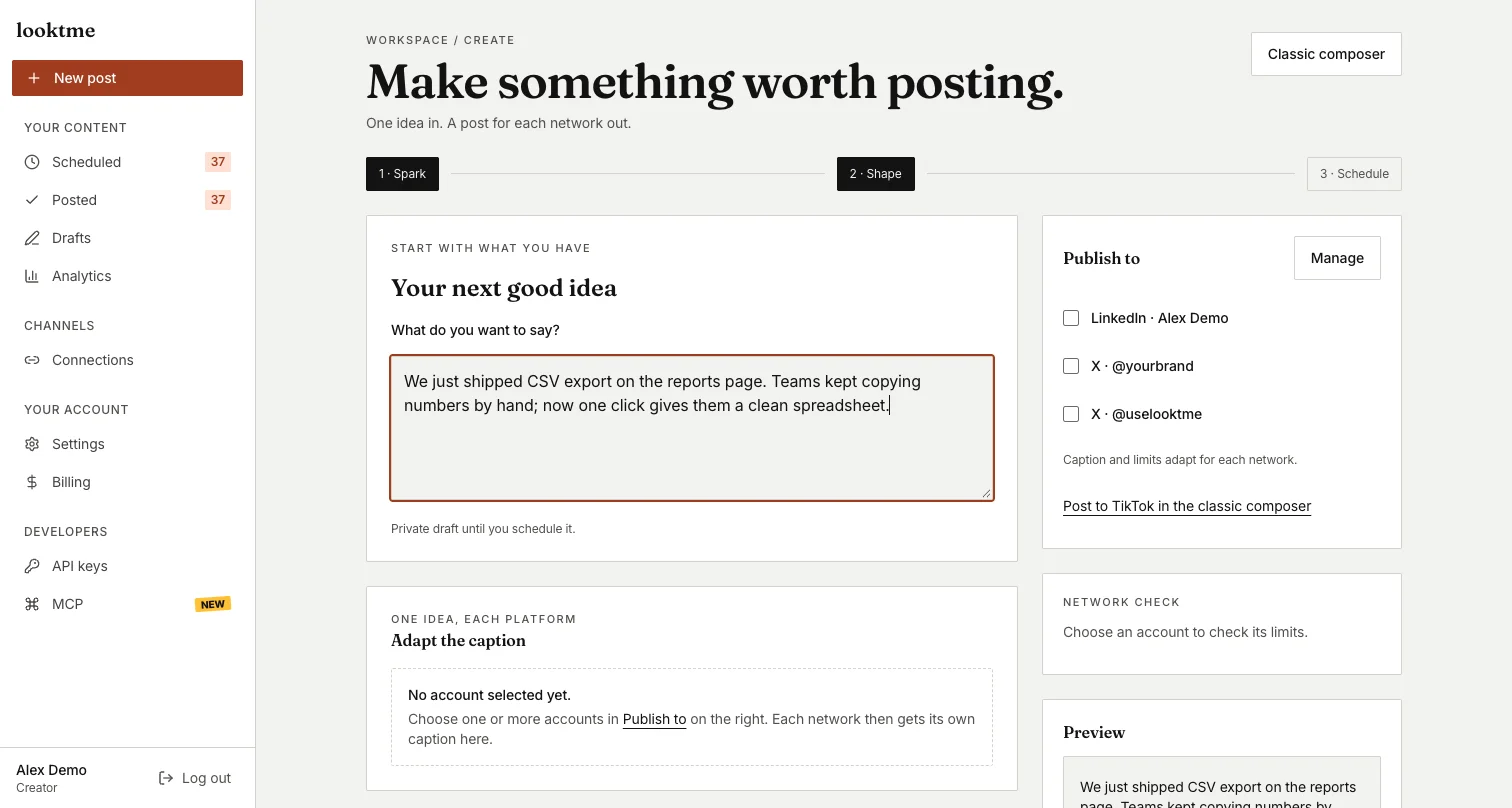
Real product screen. Account names replaced with sample names.
A simple workflow
Give each post its own time.
Choose a date and time for each version. You can close the tab once both are scheduled.
- 01Start with one product update.
- 02Edit a separate version for LinkedIn and X.
- 03Choose when each post goes live.

Built for each network
One idea, shaped for each feed.
Keep the versions separate and make your final edits before scheduling.
Know what happened
See what you published, and when.
Analytics shows what went out, what is scheduled, what failed, and the days you post most.
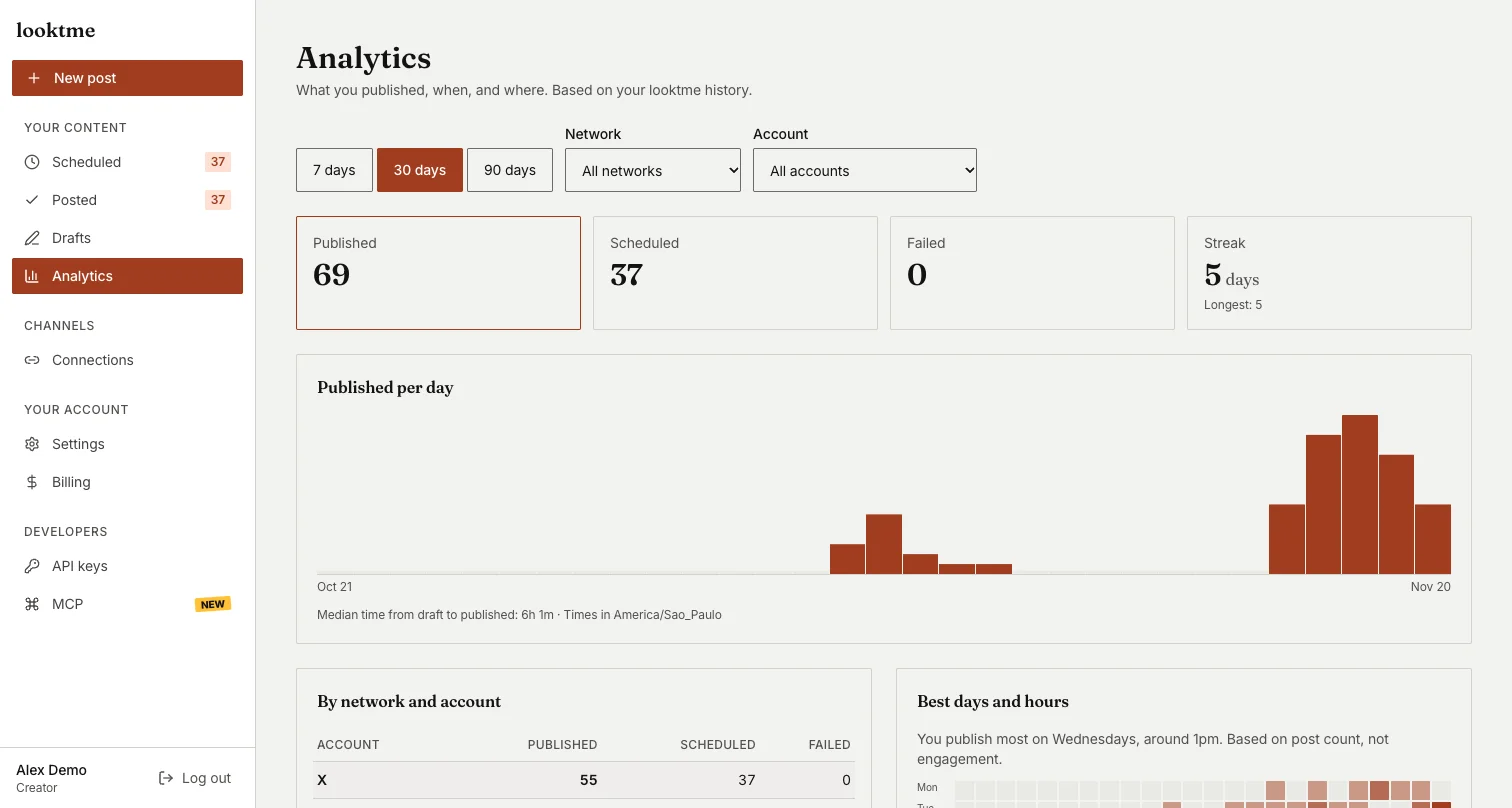
Real product screen. Account names replaced with sample names.
Pricing
One plan. Everything you need to post.
Creator has the same features monthly or yearly.
Creator
$5/month for 6 monthsThen $12/month
Billed monthly. Or $115/year, billed annually.
Code BUILD5
$5/month for your first 6 months, then $12/month.
Enter the code at checkout. One code per purchase.
- Plan and publish LinkedIn and X posts
- Post as much as you need. Fair use applies.X: up to 150 posts per account each month (links count as 5). Fair use →
- Schedule or publish now
- Status for every post
Cancel anytime in Settings → Billing; you keep access until the end of the period you paid for.
Questions, answered
Can't find yours? Email support or visit Help.
What is looktme?
looktme helps you turn your ideas into posts for LinkedIn and X. Write once, keep a separate, editable version for each network, and schedule or publish it.
How much does looktme cost?
One plan, Creator: $12/month, or $115/year. Same features either way. The yearly plan is billed once a year and saves $29 compared with 12 monthly payments.
Is there a free trial?
No. There is no free trial. You can cancel anytime, and you keep access until the end of the period you paid for.
How do I connect LinkedIn or X?
Go to Connections, choose LinkedIn or X, and sign in on that network. It asks you to approve access, then sends you back to looktme. We never see your password.
Is there a limit on how many posts I can make?
No fixed post limit: post as much as you need, under fair use. The one exception is X, because each X post has an API cost for us. Each X account can publish up to 150 posts a month, and a post with a link counts as 5, so 30 posts with links. We show a notice in looktme when you're close. If you reach it, your X posts wait until your next billing month, or you can contact support. LinkedIn and X also apply their own posting limits. See Fair use in our Terms.
How does scheduling work, and which time zone is used?
Scheduling works for both LinkedIn and X, or you can publish right away. Pick a date and time for each post. Posts go out at the time you pick, in your device's time zone, shown next to the date, even if your browser is closed. You can reschedule or cancel a post before it goes out.
Can I cancel anytime?
Yes. There's no lock-in, and you can cancel any time during the month from Settings → Billing. Cancellation takes effect at the end of the current billing period, and you keep using your Creator plan until then.
Do you offer refunds?
There's no free trial, and we don't give partial refunds. You can cancel anytime in Settings → Billing. Your subscription won't renew, and you keep access until the end of the period you've paid for. This doesn't affect your rights under consumer law. For example, in Brazil you can withdraw within 7 days of subscribing for a full refund. Questions: support@looktme.com.
Is my data safe?
Your LinkedIn and X connections are encrypted and never shown in your browser. If you disconnect an account, its scheduled posts won't go out. Deleting your account removes your connections and posts. Details are in our Privacy Policy.
Which networks can I connect?
You can connect LinkedIn and X. TikTok publishing is in early access, by invitation, while TikTok reviews our app. You can connect more than one account on each.